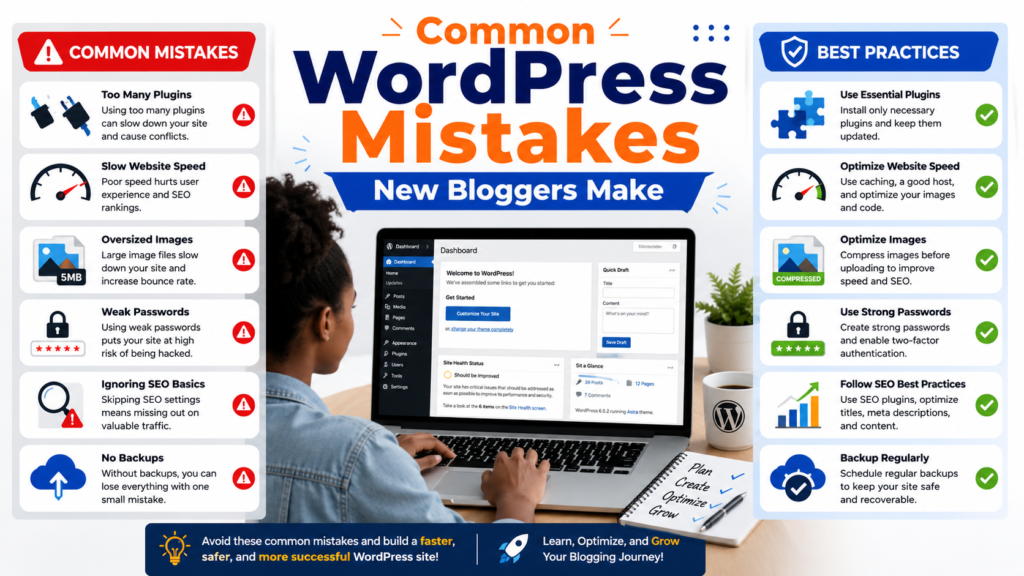
Common WordPress Mistakes New Bloggers Make (And How to Avoid Them)
Common WordPress Mistakes New Bloggers Make (And How to Avoid Them in 2026)
Discover the most common WordPress mistakes new bloggers make and learn practical solutions to improve SEO, website speed, security, and long-term blog growth.
Common WordPress Mistakes New Bloggers Make (And How to Avoid Them)
WordPress powers over 40% of websites on the internet, making it the world’s most popular content management system. Its flexibility, thousands of plugins, and endless customization options make it the perfect platform for beginners and professionals alike.
However, that flexibility comes with one major challenge: it’s incredibly easy to make mistakes.
Many new bloggers spend weeks writing articles but unknowingly damage their rankings, slow down their websites, weaken security, or create poor user experiences—all because of simple WordPress mistakes that could have been avoided from day one.
The good news is that nearly every mistake has a straightforward solution.
Whether you’ve just launched your first WordPress blog or you’ve been publishing content for a few months, this guide will walk you through the most common WordPress mistakes beginners make and explain exactly how to avoid them.
By the end of this article, you’ll know how to build a faster, safer, more professional blog that both readers and search engines love.
⸻
Table of Contents
- Choosing the Wrong Hosting
- Ignoring Website Backups
- Installing Too Many Plugins
- Using Poor-Quality Themes
- Forgetting Basic SEO
- Publishing Low-Quality Content
- Ignoring Website Speed
- Not Optimizing Images
- Using Weak Passwords
- Ignoring WordPress Updates
- Creating Bad URL Structures
- Not Using Categories Properly
- Forgetting Internal Links
- Ignoring Mobile Optimization
- Not Installing Analytics
- Using Too Many Ads
- Forgetting About Security
- Comparison Table
- Actionable Tips
- Frequently Asked Questions
- Conclusion
⸻
1. Choosing the Wrong Hosting
Many beginners choose the cheapest hosting available.
While saving money sounds appealing, poor hosting often causes:
- Slow loading times
- Frequent downtime
- Security vulnerabilities
- Poor customer support
A slow website hurts user experience and can negatively affect search rankings.
Better Approach
Choose reliable managed WordPress hosting or a reputable shared hosting provider with:
- SSD storage
- Free SSL certificate
- Daily backups
- Good customer reviews
- Excellent uptime
⸻
2. Ignoring Website Backups
Imagine spending six months writing articles only to lose everything because of a hacked website or server issue.
Unfortunately, this happens more often than people think.
Solution
Install a backup plugin and automate backups.
Store backups in cloud services like:
- Google Drive
- Dropbox
- OneDrive
Always test that backups can actually be restored.
⸻
3. Installing Too Many Plugins
One of WordPress’s greatest strengths is plugins.
One of its biggest weaknesses is also plugins.
New bloggers often install plugins for every tiny feature.
Problems include:
- Slower websites
- Plugin conflicts
- Security risks
- Broken layouts
Best Practice
Only install plugins that solve a real problem.
Delete inactive plugins instead of simply deactivating them.
Keep everything updated.
⸻
4. Using Poor-Quality Themes
Free doesn’t always mean bad.
But many free themes are:
- Poorly coded
- Abandoned
- Slow
- Not mobile-friendly
A badly built theme can damage SEO and speed.
Better Option
Choose lightweight themes known for performance, such as:
- Astra
- GeneratePress
- Kadence
- Blocksy
⸻
5. Forgetting Basic SEO
Publishing articles without SEO is like opening a shop in the middle of a desert.
No one knows you’re there.
Common mistakes include:
- No keyword research
- Missing meta descriptions
- Missing title tags
- Poor headings
- Duplicate content
Solution
Optimize every article with:
- Target keywords
- H2 and H3 headings
- Internal links
- Image alt text
- Meta description
⸻
6. Publishing Low-Quality Content
Google rewards content that genuinely helps readers.
Avoid:
- Thin articles
- AI content without editing
- Keyword stuffing
- Duplicate posts
Instead:
- Solve problems
- Use examples
- Add statistics
- Answer common questions
Quality always wins.
⸻
7. Ignoring Website Speed
Visitors expect pages to load within a few seconds.
A slow blog increases bounce rates.
Speed problems often come from:
- Heavy themes
- Large images
- Too many plugins
- Poor hosting
Improve Speed By
- Using caching
- Compressing images
- Enabling lazy loading
- Using a CDN
- Removing unnecessary plugins
⸻
8. Not Optimizing Images
Uploading a 6MB image directly from your phone slows every page.
Better Practice
Compress images before uploading.
Use:
- WebP format
- Proper dimensions
- Descriptive filenames
- Alt text
Optimized images improve both speed and SEO.
⸻
9. Using Weak Passwords
Weak passwords are one of the easiest ways hackers gain access.
Never use:
- password123
- admin
- your name
- your birthday
Instead:
- Use strong passwords
- Enable two-factor authentication
- Limit login attempts
⸻
10. Ignoring WordPress Updates
Updates aren’t just about new features.
They also fix:
- Security vulnerabilities
- Bugs
- Compatibility issues
Always update:
- WordPress core
- Themes
- Plugins
Before updating, create a backup.
⸻
11. Creating Bad URL Structures
Bad URLs look like this:
yourblog.com/?p=123
Good URLs look like:
yourblog.com/common-wordpress-mistakes
Use descriptive permalinks from the beginning.
Changing URLs later may affect SEO.
⸻
12. Not Using Categories Properly
Many beginners create dozens of unnecessary categories.
Examples:
- Blogging
- Blogging Tips
- Blog Tips
- Blogging Advice
These overlap and confuse visitors.
Instead:
Use a few broad categories.
Example:
- Blogging
- SEO
- AI
- Technology
- Marketing
⸻
13. Forgetting Internal Links
Internal links help:
- Google understand your website
- Readers discover more content
- Increase time on site
Every article should naturally link to related posts.
⸻
14. Ignoring Mobile Optimization
Most visitors browse on smartphones.
If your website looks broken on mobile:
- Visitors leave
- Rankings may suffer
- Revenue decreases
Always preview articles on mobile before publishing.
⸻
15. Not Installing Analytics
Without analytics you’re guessing.
Install tools that help you understand:
- Visitor numbers
- Traffic sources
- Popular pages
- Bounce rate
- User behavior
Use the data to improve your content strategy.
⸻
16. Using Too Many Ads
Ads can generate revenue.
Too many ads create:
- Slow pages
- Poor user experience
- Lower trust
- Lower rankings
Focus on quality content first.
Monetization comes later.
⸻
17. Forgetting About Security
Many beginners believe hackers only target large websites.
In reality, automated bots scan millions of small WordPress websites daily.
Security basics include:
- SSL certificate
- Firewall
- Malware scanner
- Daily backups
- Strong passwords
- Security plugins
- Limited login attempts
Think of security as insurance.
⸻
Comparison Table
| Mistake | Consequence | Best Solution |
| Cheap hosting | Slow website | Choose reliable hosting |
| Too many plugins | Slow performance | Install only essential plugins |
| Weak passwords | Hacking risk | Use strong passwords and 2FA |
| No backups | Data loss | Schedule automatic backups |
| Poor SEO | Low rankings | Optimize every article |
| Large images | Slow pages | Compress images |
| Ignoring updates | Security issues | Update regularly |
| No analytics | Poor decisions | Install analytics |
| Bad themes | Slow website | Use lightweight themes |
| No internal links | Poor SEO | Link related articles |
⸻
Real-World Examples
Example 1: The Slow Website
Sarah launched her food blog using a heavy theme and installed over 40 plugins. Her homepage took nearly 10 seconds to load, causing visitors to leave before reading her recipes. After switching to a lightweight theme, removing unnecessary plugins, and optimizing images, her loading time dropped below three seconds. Visitor engagement improved, and her pages began ranking better.
Example 2: The Lost Blog
David never created backups because he assumed his hosting provider would handle everything. After a malware infection corrupted his site, months of work disappeared. He rebuilt the blog and implemented automatic daily backups to cloud storage, ensuring future content could be restored quickly.
Example 3: The SEO Turnaround
Emma published more than 70 articles without targeting keywords or writing meta descriptions. Organic traffic remained low despite consistent posting.
Once she optimized existing content with proper headings, internal links, image alt text, and keyword-focused titles, search visibility gradually improved over the following months.
⸻
Actionable Tips
- Install only trusted plugins with regular updates.
- Keep WordPress, themes, and plugins updated.
- Compress every image before uploading.
- Use WebP whenever possible.
- Enable automatic backups.
- Use a lightweight WordPress theme.
- Install an SEO plugin.
- Create strong passwords and enable two-factor authentication.
- Check your website speed regularly.
- Write helpful, original content instead of chasing keywords alone.
- Review your site on mobile devices before publishing.
- Add internal links to relevant articles in every post.
- Remove unused themes and plugins.
- Monitor traffic using analytics and search performance tools.
- Test major updates on a staging environment when possible.
⸻
Frequently Asked Questions
Is WordPress difficult for beginners?
No. WordPress has a learning curve, but most beginners become comfortable after a few weeks of regular use. Starting with a lightweight theme and only essential plugins makes the experience much easier.
How many plugins should I install?
There’s no perfect number. Instead of focusing on quantity, focus on quality. A well-built site with 20 quality plugins can perform better than one with 8 poorly coded plugins.
Should I always update WordPress immediately?
Generally yes, especially for security updates. Before major updates, create a backup so you can restore your site if something goes wrong.
Are free WordPress themes safe?
Many are. Choose themes from reputable developers that receive regular updates and have strong user reviews.
How often should I back up my website?
If you publish frequently, daily backups are ideal. At a minimum, schedule weekly backups and always create one before making significant changes.
Why is my WordPress website slow?
Common causes include poor hosting, oversized images, excessive plugins, heavy themes, and a lack of caching. Addressing these issues can significantly improve loading times.
Do internal links really help SEO?
Yes. Internal links help search engines understand your site’s structure, distribute page authority, and encourage visitors to explore more content, improving engagement.
Is an SEO plugin enough to rank on Google?
No. An SEO plugin helps with technical optimization, but rankings still depend on high-quality content, search intent, backlinks, site speed, and overall user experience.
⸻
Conclusion
Building a successful WordPress blog isn’t about avoiding every mistake—it’s about recognizing problems early and fixing them before they become major obstacles.
Most new bloggers focus entirely on publishing content while overlooking the technical foundation of their websites. Yet factors like hosting quality, page speed, security, backups, SEO, and user experience play a crucial role in long-term success.
The best strategy is to keep things simple. Choose a reliable hosting provider, use a lightweight theme, install only essential plugins, optimize your images, publish genuinely helpful content, and maintain your website with regular updates and backups. These habits will save you countless hours of troubleshooting and create a stronger experience for both readers and search engines.
Remember, every successful blog started as a beginner’s website. By avoiding these common WordPress mistakes, you’ll build a faster, safer, and more professional blog that’s ready to grow with your audience for years to come.
⸻
15 Blogging Mistakes Beginners Should Avoid in 2026
How to Start a Profitable Blog in 2026: A Beginner’s Step-by-Step Guide
Best Blogging Tools for Beginners in 2026
Blogger vs WordPress: Which Is Better? (2026 Complete Comparison Guide)
How to Do Keyword Research for Beginners
